
























Why Does Your Browser Remember You? Cookies, Sessions and Local Storage Explained
Pratyksh Sharma
September 14, 2026
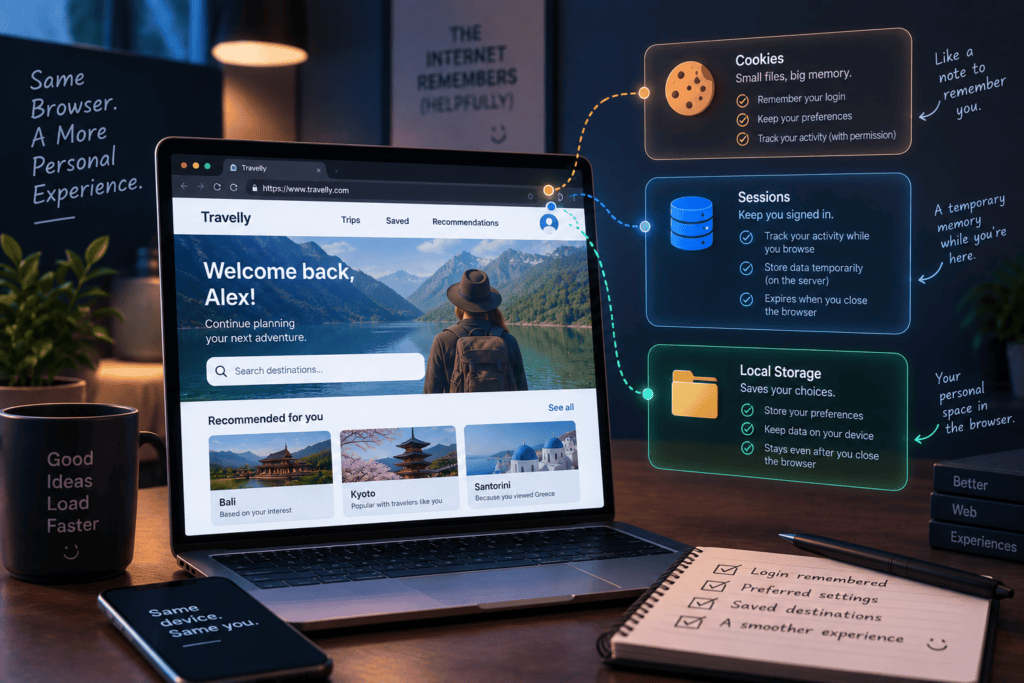
Somewhere in almost every website visit, something quietly gets remembered. You log in once and stay logged in across pages. You add something to a cart, leave, come back a day later, and it’s still there. A site remembers you prefer dark mode without ever asking again. None of that happens by magic — the browser is storing small pieces of information on your device, and which mechanism it uses for that changes what gets remembered, for how long, and who can see it.
Most people have heard the word “cookies,” usually from an annoying pop-up asking them to accept or reject them. Fewer people know that cookies are only one of at least three different tools doing this kind of remembering, each built for a different job. Understanding the difference isn’t just trivia — it explains why some things you do on a website stick around for years, while others vanish the moment you close the tab.
The Core Problem: The Web Wasn’t Built to Remember Anything
The web was originally designed around a stateless connection — every time your browser asks a server for a page, it’s treated as a brand new request, with no memory of anything that happened before. That’s fine for reading a static page, but it breaks down the instant a site needs to know who you are across multiple pages. Without some way to remember, every single page load would need you to log in again, from scratch, as if the previous page never happened.
Cookies, sessions, and local storage all exist to solve that same underlying problem — giving the web a memory it wasn’t originally built to have. They just solve it in different ways, for different lengths of time, and for different kinds of information.
What a Cookie Actually Is
A cookie is a small piece of data that a website asks your browser to store, and that your browser then sends back to that same website on every future request. It’s genuinely tiny — often just a short identifier — but that identifier is enough for a server to look you up in its own records and remember who you are.
A simple real-world example: when you log into an email account, the server doesn’t want to make you type your password on every single page you visit. So after you log in once, it gives your browser a cookie containing a unique ID. Every time you click to a new page, your browser automatically sends that cookie along with the request, and the server checks its own records, sees that ID belongs to you, and lets you straight in — no re-login required.
Cookies can be set to expire quickly, stick around for years, or disappear the moment you close the browser, depending on how the site configures them. That’s also why cookies are the mechanism most associated with tracking — an advertising network can set a cookie that gets sent back to it across many different websites, building up a picture of where you’ve been.
Sessions: The Short-Term Memory
A session is closely related to cookies but plays a slightly different role — it’s the mechanism specifically responsible for keeping you logged in and recognized while you’re actively using a site. Practically, a session usually works by combining a cookie (holding an ID) with information the server keeps on its own side, matching that ID to your actual account and login state.
Sessions are generally short-lived by design. Close the browser, or leave a banking site idle for twenty minutes, and the session often expires — which is exactly the point. A session that stayed valid forever would be a security problem; a session that resets you back to logged-out after some inactivity is a deliberate safety feature, especially on anything sensitive like banking or healthcare portals.
Local Storage: The Browser’s Own Notebook
Local storage is a different mechanism entirely, and it doesn’t involve the server at all in the same way cookies do. Instead of being sent back and forth with every request, data saved in local storage simply sits in the browser itself, tied to that specific site, and stays there until something deliberately clears it — often indefinitely, with no built-in expiration.
This is usually what’s behind the small, quality-of-life things a site remembers about how you like to use it — a dark mode preference, a dismissed notification you don’t want to see again, a half-written draft of a form you were filling out. None of that needs to be sent to the server on every page request, so local storage is a lighter, more efficient place to keep it. It also tends to hold more data than a cookie comfortably can, since it isn’t being transmitted over the network every time.
Cookies vs Sessions vs Local Storage — Put Simply
The easiest way to hold these apart: a cookie is a small note the browser hands back to the server on every request. A session is the server-side memory that a cookie’s ID points to, usually tied to being actively logged in. Local storage is a private notebook the browser keeps to itself, for things the server doesn’t need to know about at all.
They frequently work together rather than instead of each other. A single login might use a cookie to identify you, a session on the server to confirm you’re actually logged in, and local storage separately to remember your theme preference — three different tools, each handling the part it’s actually suited for.
Why This Matters for Tracking and Privacy
Cookies are the reason a product you looked at on one site can start following you around as an ad on completely unrelated sites. A third-party cookie set by an advertising network gets sent back to that same network regardless of which site you’re currently visiting, which lets it stitch together a browsing history across many different domains — not just the one you’re currently on.
This is different from a first-party cookie set by the actual site you’re visiting for a purpose like staying logged in, which is why “reject all cookies” pop-ups usually aren’t really asking you to break the site — they’re asking whether you’re comfortable with the tracking cookies specifically, not the functional ones the site genuinely needs to work. Local storage carries a smaller tracking risk in general, since it isn’t automatically transmitted across sites the way cookies are, but it isn’t inherently private either — anything stored on your device can still be read by the site that put it there.
When Each One Makes Sense — and When It Doesn’t
Cookies make sense for anything that genuinely needs to travel with every request to the server — staying logged in, remembering a shopping cart tied to your account, or anything the server itself needs to check on every page load. They make less sense as a place to stuff large amounts of data, since every cookie gets sent back and forth on every request, adding overhead the browser doesn’t need to carry.
Sessions make sense for anything security-sensitive, where “log the user out after inactivity” is a feature, not an inconvenience. Local storage makes sense for preferences and lightweight data the server never needs to see — a theme choice, a draft, a dismissed banner — and makes less sense for anything sensitive, since it sits in the browser with weaker built-in protections than a properly configured session.
There’s No Single “Right” One
The honest answer to “should my browser remember this with a cookie, a session, or local storage” is that it depends on what’s actually being remembered, not a universal best option. Cookies exist to travel with requests and identify you to a server. Sessions exist to keep that identification short-lived and secure while you’re actively logged in. Local storage exists for things the browser can just hang onto quietly, on its own, without bothering the server at all.
Together, they’re the reason the modern web feels like it recognizes you — your cart is still full, your login sticks around, your preferences persist — even though the underlying system was never designed to remember anything in the first place.
Let’s build your next project
Tell us about your idea and we'll get back within 24 hours.


Hi, I’m Pratyksh Sharma, the CEO and Founder of Infyras. Don’t hesitate to reach out to me anytime – I’m here to answer all your questions!
Your next idea Let’s make it happen.
From insights to inspiration, we create digital solutions that turn ideas into results. Have a project in mind? Let’s build something that moves your business forward.