
























What Are Feature Flags? How Developers Release New Features Without Breaking the App
Pratyksh Sharma
September 12, 2026
Somewhere in almost every product team, the same question comes up: the code for a new feature is ready, so does it just go live for everyone, all at once? It sounds like a small decision, but it’s one of the things that most affects how safely a team can ship, how quickly they can recover when something goes wrong, and how much stress a release day actually carries. The answer, for most teams building anything serious, is a feature flag — and it’s one of those pieces of software infrastructure that almost everyone has benefited from without ever hearing the term.
We see both extremes. Teams that deploy everything straight to production and hope for the best, treating every release as an all-or-nothing event. And teams that pile on so many flags, for so many small things, that nobody remembers which ones are still doing anything. Neither instinct is wrong exactly — deploying without flags works fine for low-risk changes, and flags genuinely do accumulate cruft over time. The skill is knowing when a flag earns its place and when it’s just extra complexity.
What a Feature Flag Actually Is
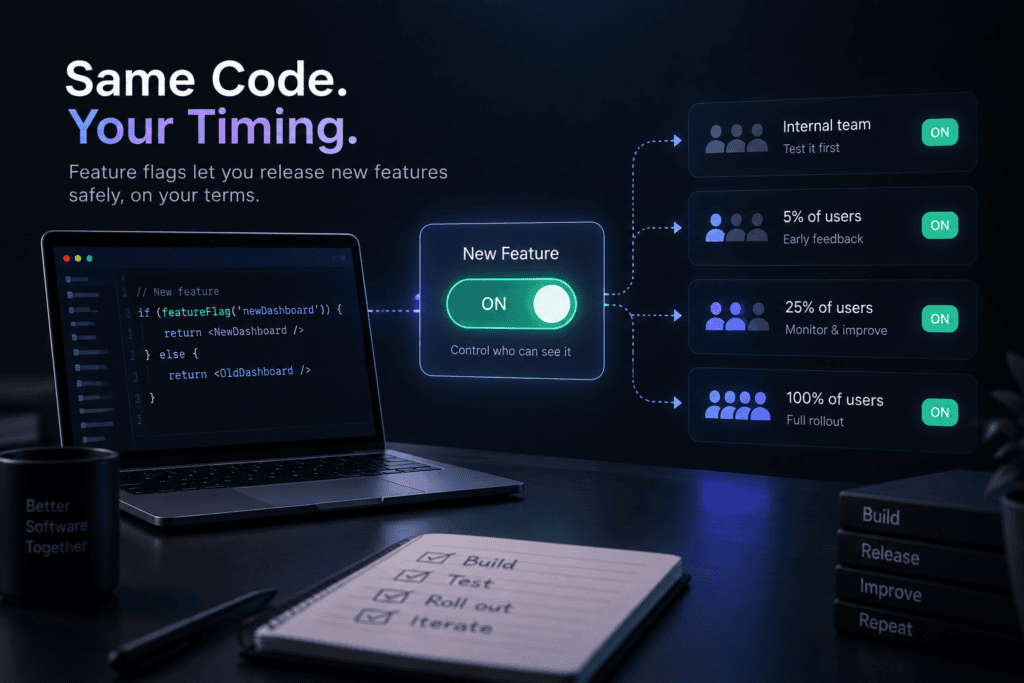
A feature flag is essentially a switch in the code that controls whether a piece of functionality is turned on or off — without needing to change or redeploy the code itself. The feature is already sitting in the app, built and shipped, but wrapped in a check that says “only show this if the flag is on.” Flip the flag, and the feature appears. Flip it back, and it disappears, instantly, for whoever needs it to.
A simple way to picture it: imagine a new checkout button has been built and deployed to the live app, but it’s wrapped in a condition that only shows it to users flagged as “internal team.” Customers see the old checkout exactly as before. The team can click through the new one, catch problems, and adjust — and none of it involves customers seeing anything different, because the flag is simply off for everyone outside that group.
Deploying Code vs Releasing a Feature — Not the Same Thing
This is the idea that unlocks everything else about feature flags: deploying code and releasing a feature don’t have to happen at the same moment. Deployment is a technical event — the new code is now running on the servers. Release is a business decision — real users are now allowed to see and use it. Without flags, those two things are stuck together; the moment code is deployed, it’s live for everyone. With flags, they’re separated, and that separation is where almost all the practical benefit comes from.
That gap between deploying and releasing gives a team room to breathe. Code can be pushed to production well before it’s ready for the public, tested against real infrastructure with the flag off, and released whenever it’s actually right — not whenever the deploy pipeline happens to finish.
How Developers Use Flags for Testing
Because a flag can be scoped to a specific group, developers use them to test a feature against real production conditions before customers ever see it. The feature might be turned on only for the internal team, or only for accounts marked as beta testers, while staying completely invisible to everyone else. This catches a category of problem that’s nearly impossible to find in a staging environment — how the feature behaves under real traffic, real data, and real edge cases nobody thought to simulate.
Gradual Rollouts
Once a feature has cleared internal testing, flags let it roll out gradually instead of flipping on for the entire user base at once. A common pattern is releasing to 5% of users, watching how the system holds up, then moving to 25%, then 50%, then everyone — with the option to stop or reverse at any point along the way. If something looks wrong at 5%, it only ever affected a small slice of users, and it’s still fully reversible.
A/B Testing
The same mechanism that controls a gradual rollout can just as easily split users into groups that see different versions of a feature at the same time. Half the users might see a new pricing page, the other half the old one, with the flag deciding which version each person lands on. That comparison is how teams make decisions based on what actually performs better, rather than on which version someone happened to prefer in a meeting.
Turning Features On or Off Without Redeploying
One of the most practically useful properties of a flag is that flipping it doesn’t require a new deployment. Redeploying an application, even a small change, takes time and carries its own risk. A flag can be toggled in seconds through a dashboard, which means a team can respond to a live situation — a surge in traffic, a bug reported by a customer, a feature that isn’t behaving as expected — immediately, instead of waiting on a full deploy cycle to make the fix.
How Feature Flags Help When Something Goes Wrong
This is arguably the single biggest reason serious engineering teams use flags at all: they turn “we need to roll back a deployment” into “we need to flip a switch.” Rolling back a deployment can be slow, sometimes risky in its own right, and occasionally not even fully possible if other changes have piled on top of it. Turning off a flag is instant and safe, because the rest of the application keeps running exactly as it was. A feature causing errors in production can be switched off in the time it takes to click a button, while everyone figures out what actually went wrong — without an emergency deployment in the middle of the incident.
Feature Flags in SaaS and E-commerce
In SaaS products, flags are often how companies gate features by pricing tier — a “Pro” feature might exist in the codebase for every customer, but the flag only switches on for accounts on the right plan. In e-commerce, flags commonly control things like new checkout flows, promotional banners, or seasonal features that need to appear and disappear on a schedule, all without a developer needing to touch the code on the day it needs to change. In both cases, the flag is doing double duty — controlling risk during rollout, and controlling access on an ongoing basis afterward.
The Risks of Having Too Many Feature Flags
Flags are cheap to add and easy to forget about, which is exactly how a codebase ends up with hundreds of them, most no longer serving any purpose. A flag that was meant to control a two-week rollout can quietly stick around for years, still wrapped around the code, still being checked on every request, long after every user has been fully rolled onto the feature. Beyond the general clutter, stacks of old, unused flags make the codebase genuinely harder to reason about — a developer reading through the logic has to figure out which combinations of flags are even still possible, and testing every plausible combination becomes its own quiet burden. Left unmanaged, a flag system built to reduce risk can slowly turn into a source of it.
When Feature Flags Make Sense — and When They Don’t
Flags earn their place for anything risky enough to want a safety net — a checkout redesign, a pricing change, a new integration touching real customer data, anything where “we need to turn this off immediately” is a realistic scenario worth planning for. They’re also worth it for anything that needs to be tested against real production conditions before going fully public, or anything gated by plan, region, or user group on an ongoing basis.
They make less sense for small, low-risk changes — a copy tweak, a minor styling fix, something with no meaningful blast radius if it turns out wrong. Wrapping every tiny change in a flag adds overhead without adding much real protection, and it’s exactly this habit that leads to the flag sprawl teams eventually have to clean up. The question worth asking before adding one: if this went wrong in production, would having an instant off-switch actually matter? If yes, a flag is probably worth it. If the honest answer is “not really,” a normal deploy is simpler and just as safe.
There’s No Universal Rule Here
The honest answer to “should this be behind a flag” is that it depends on the specific feature, not on a blanket habit of flagging everything or flagging nothing. Feature flags are one of the more valuable tools in modern software development precisely because they separate deploying code from releasing it to real users — giving teams room to test safely, roll out gradually, and recover instantly when something doesn’t go as planned. Used well, they turn releases from stressful, all-or-nothing events into something closer to a dial a team can turn up slowly and turn back down the moment it needs to.
Let’s build your next project
Tell us about your idea and we'll get back within 24 hours.


Hi, I’m Pratyksh Sharma, the CEO and Founder of Infyras. Don’t hesitate to reach out to me anytime – I’m here to answer all your questions!
Your next idea Let’s make it happen.
From insights to inspiration, we create digital solutions that turn ideas into results. Have a project in mind? Let’s build something that moves your business forward.