





















What Actually Happens After Someone Clicks Your Google Ad?
Most businesses obsess over the ad itself. They test headlines, tweak keywords, and argue about budget. Then someone clicks, and the attention stops. That click... Continue reading
Pratyksh Sharma
October 14, 2026
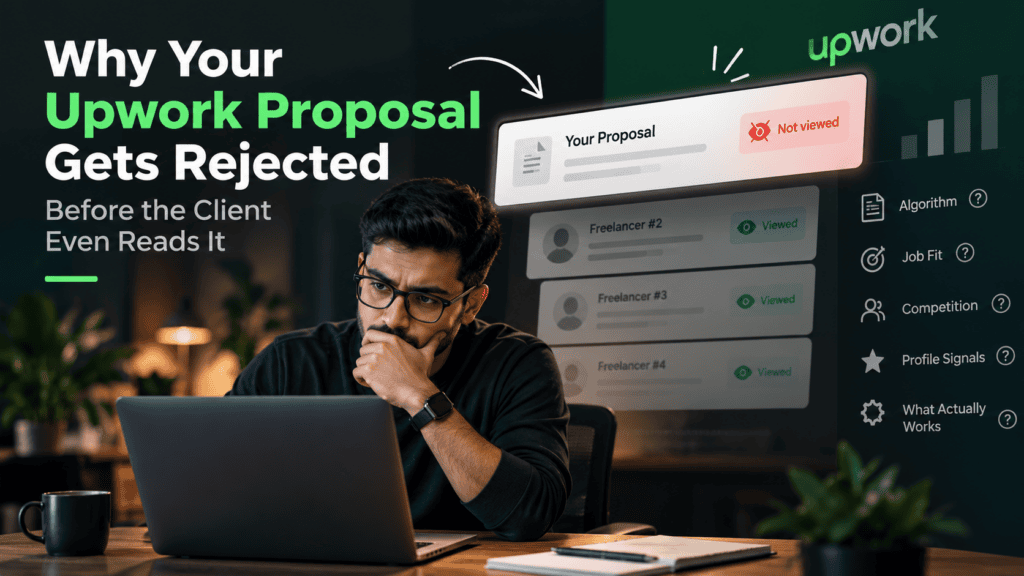
You send a proposal. A day passes. Then three. The status still says “Submitted.”
Most freelancers and agencies read that silence as rejection. They assume the pitch was weak, the price was wrong, or the client picked someone better.
Often, none of that is true. The client may never have opened the proposal at all.
That matters because the fix is completely different. A proposal that nobody viewed has a visibility problem. A proposal that someone viewed and ignored has a persuasion problem. If you treat both the same way, you’ll fix the wrong thing.
Here’s how to tell them apart, and what to do about each.
Start with the basic question. Did the client open your proposal?
Upwork’s Stats and trends page shows which proposals have been viewed, how many times, and when. Check it before you change anything.
If the proposal wasn’t viewed, the client never saw your pitch. Your writing didn’t fail, because nobody read it. The problem sits earlier in the chain: your ranking in the list, your fit with the job, or the volume of competition.
If the proposal was viewed and got no reply, the client read it and moved on. Now the pitch itself is on trial. Your offer, your proof, your price, or your tone didn’t convince them.
One caution before we go further. A “viewed” status shows that someone opened the proposal. It doesn’t show how long they read or what they thought. Treat it as a useful signal, not a verdict.
Upwork says plainly that clients may not reach your proposal when a job gets high volume. On a popular posting, the client may shortlist a few people and start interviews long before they scroll to the bottom.
Several factors decide where you land.
Clients don’t see a simple first-come list. Upwork says it uses machine learning to compare your proposal and profile against the job posting. It looks at keywords, skills, experience, and work history. When a client receives multiple proposals, Upwork shows the closest matches first.
So a strong match sent at hour six can outrank a weak match sent at minute one. But speed still helps. Upwork notes that proposals sent early, or as close matches, are more likely to appear near the top.
Clients decide whether to click based on a small preview. They see your profile photo, title, rate, and Job Success Score. They also see your name, talent badges, and the first lines of your cover letter.
That preview carries a lot of weight. If it looks generic, the client has little reason to open the rest.
Upwork lists the most common reasons proposals go unseen. They include generic proposals, an incomplete or outdated profile, off-target pricing, a skills mismatch, and limited availability or slow replies.
Notice that three of those five sit outside the proposal itself. Your profile and responsiveness shape your visibility before you write a single word.
Many unviewed proposals share one root cause. The freelancer applied to a job that wasn’t a close match.
Upwork’s ranking rewards fit. A proposal outside the client’s budget range ranks lower, because the system treats it as a weaker match. The same logic applies to skills and experience.
That changes how you should choose jobs. Applying to everything feels productive. In practice, it spreads your effort across proposals that rank poorly before anyone reads them.
Try this instead:
A short list of strong fits beats a long list of weak ones.
Clients scan. They see the first couple of lines and decide whether to click “Read more.” Upwork advises spending extra time on those first sentences, and for good reason. They appear in the preview, so they work as your headline.
Most weak openings sound the same:
“Hello, I am a professional developer with 7 years of experience. I have read your job description and I am confident I can do this.”
This tells the client nothing about their project. Fifty other proposals open the same way.
Compare it with something specific:
“Your WooCommerce store needs the shipping rules to change by region without breaking checkout. I’ve fixed this exact problem on a multi-currency store, and I’d start by auditing how your rules are stored.”
The second version shows you read the posting. It names the problem, proves relevant experience, and hints at a plan. All of that fits in the preview.
A few habits help:
Even a good proposal competes with many others. Upwork’s own research cites more than one million jobs posted annually on its U.S. marketplace, and popular postings attract large numbers of applicants.
Clients also behave in ways you can’t control. Some shortlist quickly on high-volume jobs. Some favor freelancers who reply fast. Some filter for available talent only. Others post a job, get distracted, and come back a week later, or never.
So not every unviewed proposal signals a problem with you. Sometimes the client simply went quiet.
You can still tilt the odds in your favor:
Boosting can place your proposal in a top slot. Upwork marks the first four slots with a blue lightning bolt, and it shows how many Connects you need to win one.
It can work, but Upwork says boosting works best when the proposal is already well matched and tailored to the client. Boosting a weak proposal just pays more to be ignored faster.
Use it selectively. Boost the jobs where you’re a strong fit, the budget is healthy, and you can prove relevant results.
Don’t guess. Run a quick check.
If you subscribe to Freelancer Plus, Upwork’s proposal insights add more context. They show how many organic proposals a client has opened, shortlisted, and messaged, along with average bid amounts for a job. Note that Upwork lists this feature under Freelancer Plus, not Agency Plus.
Agencies face a slightly different version of the same problem. A client sees an agency profile and compares it with individual freelancers. To stand out, the proposal needs to show something a solo freelancer can’t easily offer: a clear process, a team with defined roles, and proof that the work continues after delivery.
That’s also where our own approach on Upwork comes from. At Infyras, we treat a proposal like a small piece of marketing. It needs a clear audience, a specific message, and a reason to act. We’d rather send fewer proposals that fit well than many that don’t.
A silent proposal isn’t always a failed proposal. Before you rewrite your pitch, find out whether anyone read it.
If nobody did, work on visibility: job fit, profile quality, timing, and the first lines of your cover letter. If they did, work on persuasion: proof, clarity, and price.
Diagnose first. Then fix the right problem.
Sources:
Tell us about your idea and we'll get back within 24 hours.

Hi, I’m Pratyksh Sharma, the CEO and Founder of Infyras. Don’t hesitate to reach out to me anytime – I’m here to answer all your questions!
Digital Marketing
23 September, 2026
Most businesses obsess over the ad itself. They test headlines, tweak keywords, and argue about budget. Then someone clicks, and the attention stops. That click... Continue reading

Business Solution
21 September, 2026
Accessibility tends to get introduced to business owners as a legal risk — a fine to avoid, a lawsuit to dodge, a checkbox on a... Continue reading

Digital Marketing
02 September, 2026
A client comes to us with a familiar story. They’ve been running ads for a few months, posting consistently on Instagram, maybe even ranking for... Continue reading
From insights to inspiration, we create digital solutions that turn ideas into results. Have a project in mind? Let’s build something that moves your business forward.